The VBAPI search functionality is structured around three key components:
- SearchConfig – Defines the data sources (tables and columns) available for querying.
- SearchCriteria – Specifies filtering conditions, akin to a SQL
WHEREclause. - SearchRequest – Combines the search configuration and criteria to execute queries and retrieve results.
Use the navigation links below to explore each part of the search process:
- SearchRequest – Combines config and criteria to retrieve search results.
- SearchConfig – Defines what data sources (tables/columns) are available.
- SearchCriteria – Specifies filtering conditions.
- Search Results – Displays the results of the search query.
- Sorting – Sorting approach for search results.
- Pagination – Navigate search results across multiple pages.
A SearchConfig is a predefined set of related tables and columns that serve as the basis for a search. Each SearchConfig represents a logical grouping of data sources.
For example, the CLAIMBATCH SearchConfig includes the following tables:
- CLAIMBATCH
- CLAIMBATCHDETAIL
- CLAIMBATCHES
- PROVIDER
- MEMBERBENEFICIARY
- MEMBERS
- PROCEDURECODE
Using this SearchConfig allows filtering and returning data from any of the above tables.
View the full list of SearchConfigs and their associated tables. This reference helps you discover what data is accessible for search queries in each configuration.
A SearchCriteria object defines the filtering logic for API search operations. It determines which records to include or exclude from your result set, functioning similarly to a WHERE clause in SQL.
| Property | Type | Description |
|---|---|---|
searchConfigId | string | Identifies which search configuration to use (e.g., "CLAIMBATCH", "CLAIM") |
criteria_Key | number | Unique identifier for saved criteria (system-generated for persistent criteria) |
description | string | Human-readable description of the criteria's purpose |
temporary | boolean | When true, criteria is stored temporarily; when false, it's persisted |
criteriaDetails | array | Collection of individual filter condition objects |
Each object in the criteriaDetails array defines a single filter condition:
| Property | Type | Description |
|---|---|---|
criteria_Table | string | Database table containing the field to filter |
criteria_Column | string | Column/field name to apply the filter to |
criteria_Data_Type | string | Data type ("string", "number", "date", etc.) |
criteria_Operator | string | Comparison operator (=, >, <, >=, <=, <>, BETWEEN, LIKE, NOT LIKE, IS NULL, IS NOT NULL, STARTSWITH, ENDSWITH) |
criteria_From_Value | string | Primary comparison value (all values are sent as strings) |
criteria_To_Value | string | Optional upper bound for range operations like "BETWEEN" |
criteria_Join | string | Logical operator ("AND", "OR") connecting to the next condition |
criteria_Group | number | Groups conditions with parentheses (same number = same group) |
The following UI representation illustrates how SearchCriteria are structured:

In the example above:
- The search filters records where
Procedure_Codeis99212andBirth_Dateis after01/01/1974. - The conditions are combined using the
ANDoperator.
Parentheses can be used to create logical groupings of conditions, similar to SQL expressions. The UI below demonstrates grouped filters:
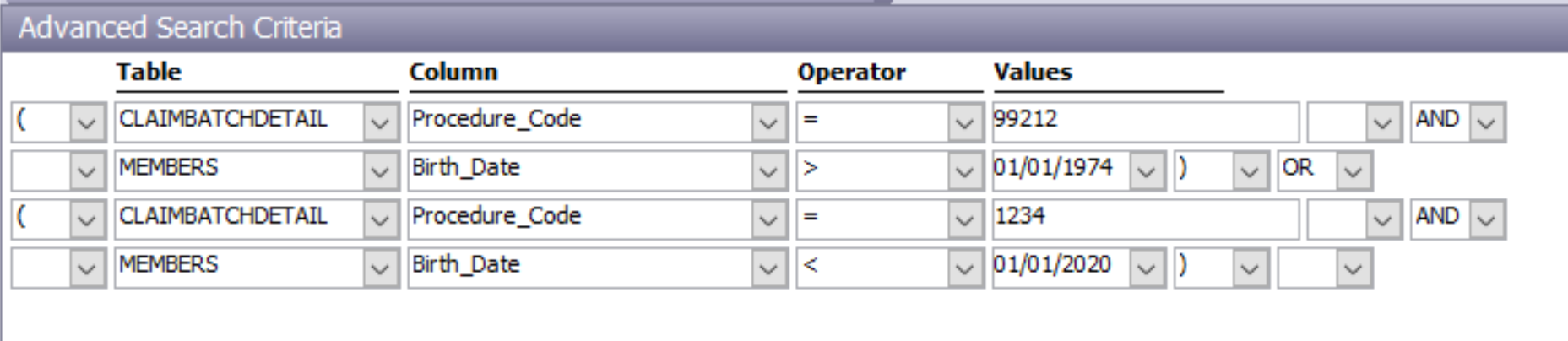
In this example:
- The first two conditions (
Procedure_Code = 99212ANDBirth_Date > 01/01/1974) are enclosed in parentheses. - The grouped conditions are evaluated together and combined with an
ORcondition linking another set of filters (Procedure_Code = 1234ANDBirth_Date < 01/01/2020).
Here's how a simple filter (matching Procedure_Code = 99212) is represented in JSON:
{
    "searchConfigId": "CLAIMBATCH",
    "criteria_Key": 84,
    "description": "Claim Batches with Proc Code 99212",
    "criteriaDetails": [
        {
            "criteria_Key": 84,
            "criteria_Seq": 1,
            "criteria_Table": "CLAIMBATCHDETAIL",
            "criteria_Column": "Procedure_Code",
            "criteria_Data_Type": "string",
            "criteria_Operator": "=",
            "criteria_From_Value": "99212",
            "criteria_AndOr": null
        }
    ],
    "temporary": false
}{
"searchConfigId": "CLAIM",
"criteria_Key": 92,
"description": "High Value Claims from Last Month",
"temporary": true,
"criteriaDetails": [
{
"criteria_Table": "CLAIM",
"criteria_Column": "Claim_Amount",
"criteria_Data_Type": "number",
"criteria_Operator": ">",
"criteria_From_Value": "5000",
"criteria_Join": "AND"
},
{
"criteria_Table": "CLAIM",
"criteria_Column": "Claim_Date",
"criteria_Data_Type": "date",
"criteria_Operator": "BETWEEN",
"criteria_From_Value": "2023-01-01",
"criteria_To_Value": "2023-01-31"
}
]
}A SearchRequest combines:
- A
SearchConfig→ Defines the tables and columns that are searchable. - A
SearchCriteria→ Specifies the filtering logic (like a WHERE clause). - A list of
selectedFields→ Specifies exactly which fields to return in the result set.
This structure allows clients to dynamically query complex, joined datasets while staying within the bounds of predefined configurations.
| Field | Type | Required | Description |
|---|---|---|---|
criteria_Key | integer | ✅ | The unique ID of the SearchCriteria to apply (like a saved filter). |
searchConfigId | string | ✅ | The ID of the SearchConfig to use. Determines table joins and access. |
user_ID | string or null | ❌ | The ID of the user performing the search. |
page | integer or null | ❌ | If paginating results, specify the page number here (0-indexed). |
pageCount | integer or null | ❌ | Number of records per page. Defaults apply if omitted. |
include_Result_Details | boolean or null | ❌ | If true, includes extra metadata about the search results. |
use_Random_Sample | boolean or null | ❌ | Enables random sampling. Requires random_Sample_Count. |
random_Sample_Count | integer or null | ❌ | Number of records to randomly sample. Must be 0–1000 (or up to 750 if paging). |
random_Sample_Count_Is_Percent | boolean or null | ❌ | If true, random_Sample_Count is treated as a percent (0–100). |
use_Nth_Result | boolean or null | ❌ | Enables returning every nth result from the dataset when set to true. |
nth_Result | integer or null | ❌ | Specifies the interval (n) for returning results. Must be ≥ 1. |
selectedFields | array | ❌ | Array of field objects specifying which columns to return |
This request fetches selected fields (First_Name, Last_Name, Procedure_Code) for records matching the defined criteria:
{
    "criteria_Key": 84,
    "searchConfigId": "CLAIMBATCH",
    "selectedFields": [
        { "tableName": "Members", "columnName": "First_Name" },
        { "tableName": "Members", "columnName": "Last_Name" },
        { "tableName": "ProcedureCode", "columnName": "Procedure_Code" }
    ]
}To get a random subset of the results:
{
  "criteria_Key": 84,
  "searchConfigId": "CLAIMBATCH",
  "use_Random_Sample": true,
  "random_Sample_Count": 100
}{
"criteria_Key": 84,
"searchConfigId": "CLAIMBATCH",
"use_Random_Sample": true,
"random_Sample_Count": 10,
"random_Sample_Count_Is_Percent": true
}Return every 5th result from the query:
{
  "criteria_Key": 84,
  "searchConfigId": "CLAIMBATCH",
  "use_Nth_Result": true,
  "nth_Result": 5
}By default, results are sorted in ascending order based on the first field in the selectedFields array.
{
    "criteria_Key": 84,
    "searchConfigId": "CLAIMBATCH",
    "selectedFields": [
        { "tableName": "Members", "columnName": "First_Name" },
        { "tableName": "Members", "columnName": "Last_Name" },
        { "tableName": "ProcedureCode", "columnName": "Procedure_Code" }
    ]
}
Here, the results are sorted by First_Name (ascending) as it appears first.
The response includes:
- The SQL query executed (
search_SQL_Statement) - Column mappings (
fieldMapping) - The result set (
results)
{
    "searchConfigId": "CLAIMBATCH",
    "criteria_Key": 84,
    "search_SQL_Statement": "SELECT * FROM ...",
    "fieldMapping": [
        { "tableName": "Members", "columnName": "First_Name", "columnIndex": 0 },
        { "tableName": "Members", "columnName": "Last_Name", "columnIndex": 1 },
        { "tableName": "ProcedureCode", "columnName": "Procedure_Code", "columnIndex": 2 }
    ],
    "results": [
        ["Jane", "Doe", "99212"],
        ["John", "Smith", "1234"]
    ]
}For large datasets, results are paginated. Include page and pageCount parameters in your request to control pagination.
{
    "criteria_Key": 84,
    "searchConfigId": "CLAIMBATCH",
    "selectedFields": [
        { "tableName": "Members", "columnName": "First_Name" },
        { "tableName": "Members", "columnName": "Last_Name" }
    ],
    "page": 0,
    "pageCount": 100
}The X-Pagination response header contains:
{
    "TotalCount": 1000,
    "TotalPages": 10,
    "CurrentPage": 0,
    "PageSize": 100
}
This ensures structured navigation of search results.
- Criteria are stored transiently in the system
- Each SearchConfig maintains the five most recent temporary criteria for quick reuse
- Ideal for criteria you may need again in the short term but don't need permanently
- Criteria are persisted indefinitely in the database
- Recommended for:
- Frequently used search patterns
- User-defined filters
- Report templates
- Common query definitions
- Minimize conditions: Include only necessary filter conditions
- Leverage indexed columns: Prioritize filtering on indexed fields when possible
- Break down complex queries: For intricate search needs, consider multiple smaller, targeted criteria
- Order conditions efficiently: Place the most restrictive conditions first when filtering large datasets